Contents
gPanel will automatically re-index each time a user logs in, but changes made in the Google Admin console in the interval may not be reflected until the next re-indexing. We recommend, as a best practice, to make such changes in gPanel as these changes will be applied immediately to your domain.
If you have made changes in the Google Admin console that aren't reflected in gPanel, re-index the corresponding entity (users, org units, or groups) or the entire domain in gPanel to ensure that gPanel reflects the entities on your domain accurately.
gPanel Indexing
Begin by selecting the domain you wish to index from the drop-down menu. If you wish to index the domain's entities completely, click Index Domain Completely. If you wish to index only those changes made since the last indexing, click Re-Index Domain Since Last Run.
The following information will be displayed:
- Current Indexed User Count
- Current Indexed Group Count
- Current Indexed Calendar Count
- Current Indexed Organization Count
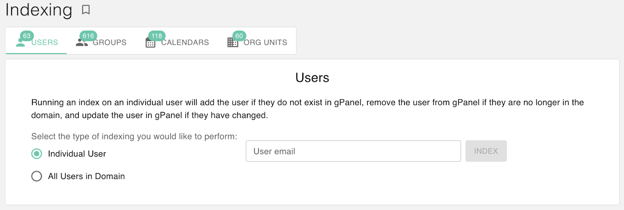
User Indexing
Running an index on an individual user will add the user if they do not exist in gPanel, remove the user from gPanel if they are no longer in the domain, and update the user in gPanel if they have changed. You will have the option to index an Individual Group or All Groups In Domain.
The following information will be displayed:
- Last Completion Time
- Manual Run
- Email Domain
- Users Added
- Users Updated
- Users Removed
- Alias Added
- Alias Deleted
Group Indexing
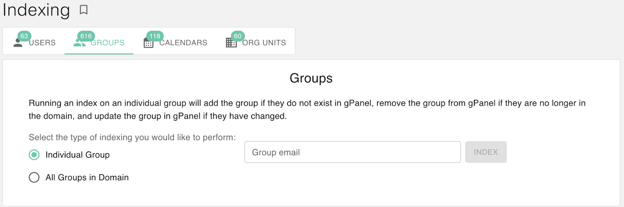
Running an index on an individual group will add the group if they do not exist in gPanel, remove the group from gPanel if they are no longer in the domain, and update the group in gPanel if they have changed. You will have the option to index an Individual Group or All Groups In Domain.
Calendar Indexing
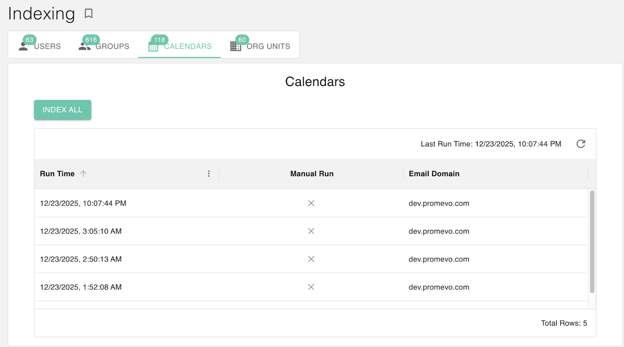
If you wish to index ALL domain calendars, click Index All. If you wish to index only those changes made since the last indexing, click Re-Index Calendars Since Last Run.
The following information will be displayed:
- Last Run Time
- Manual Run
- Email Domain
Organizational Unit (OU) Indexing
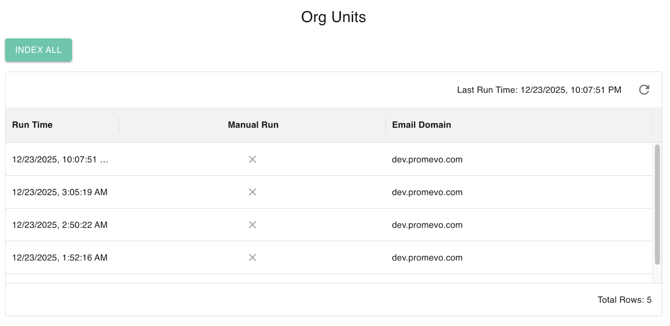
If you wish to index ALL of the organizational units in your domain, click Index All. If you wish to index only those changes made since the last indexing, click Re-Index Org Unit Since Last Run.
The following information will be displayed:
- Last Run Time
- Manual Run
- Email Domain