
Contents
In a rapidly evolving SaaS environment, the ability to test new tools before they become standard features is essential for forward-thinking IT teams. gPanel Labs is a dedicated testing environment designed for experimental features that are in the final stages of development but have not yet been deployed to the general platform.
Think of Labs as an "Innovation Sandbox." It allows administrators to opt into beta capabilities, providing early access to advanced functionality. However, because these features are experimental, they are subject to change, potential instability, or even removal.
Using Labs gives your team a competitive edge by allowing you to refine your workflows with next-generation tools while providing valuable feedback that shapes the future of the gPanel platform.
Identifying Beta Capabilities
Navigating the Labs interface is designed to be highly intuitive. Within the Labs tab, all experimental features are clearly marked with a green laboratory beaker icon. This visual indicator serves as a reminder that the tool is currently in a beta state and should be used with the understanding that it is part of an ongoing developmental cycle.
Key Example: gPanel Contacts
A perfect example of a feature currently residing in this experimental phase is gPanel Contacts. Located under Directory > gPanel Contacts, this tool is a "System of Record" that was introduced via Labs to allow administrators to centralize organizational contact data.
By opting into this Labs feature, admins can migrate user-owned contacts into a global, admin-managed directory before the feature is fully integrated into the standard gPanel core.
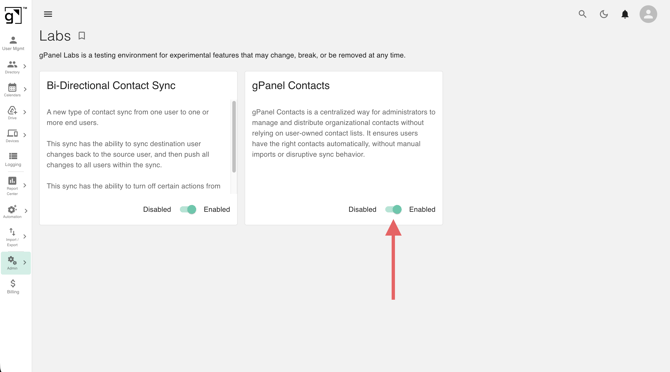
Managing Your Labs Features
The Labs tab is built for flexibility. Administrators have the power to customize their experience based on their specific organizational needs:
-
Enable/Disable: Every feature within Labs can be toggled on or off at any time. If a beta tool doesn't fit your current workflow or presents a conflict, you can disable it instantly.
-
On-Demand Access: Users have the ability to add specific capabilities based on their unique use cases, ensuring the platform remains lean and focused only on the tools you find valuable.
Disclaimer and Best Practices
Because Labs features are experimental, we recommend testing them within a controlled group of users before a full-scale rollout. While these tools are designed to enhance your domain governance, their "beta" status means they are best utilized by administrators who are comfortable with the iterative nature of software development.