
For added security beyond just passing an API Key, we can use the IP Intrusion feature of gPanel to allow calls only from IP addresses on the Allow List.
To enable this, visit Administration > Settings > IP Intrusion, and enable API IP Restricting as shown.
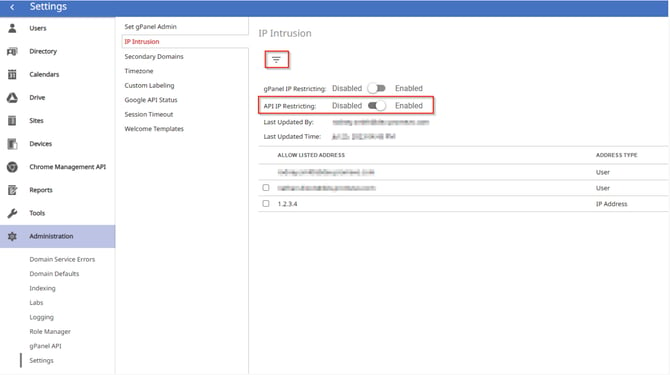
Why API IP Restricting Matters for Your Organization
In a modern digital environment, relying solely on an API key is often not enough to ensure the security of your sensitive domain data. Enabling API IP Restricting within gPanel adds a critical layer of defense to your automation and integration workflows.
The Benefits of IP-Based Security for Your Google Workspace Environment
-
Defense-in-Depth: Even if an API key is accidentally leaked or stolen, an unauthorized actor cannot use it unless they are also making requests from an approved IP address on your Allow List.
-
Reduced Attack Surface: By limiting access to specific, known locations (such as your office network or a dedicated cloud server), you effectively block attempts from malicious actors elsewhere in the world.
-
Granular Control: The gPanel IP Intrusion feature allows admins to maintain a curated list of trusted addresses, ensuring that only verified environments can interact with the gPanel API.
-
Auditability and Compliance: Many security frameworks require strict access controls for administrative tools. Restricting API access by IP helps fulfill compliance requirements and provides clearer logs of where administrative changes are originating.
Use Cases for gPanel Admins
-
Static Office Networks: If your IT team runs automation scripts only from within the corporate office, you can restrict access to your office’s static public IP.
-
Secure Cloud Integrations: When using third-party tools or custom cloud functions (like those on AWS, Azure, or Google Cloud), you can allow only the specific IP addresses of those server instances.
-
Preventing Credential Misuse: This feature ensures that even if an administrator’s workstation is compromised, the gPanel API remains protected from external, unauthorized locations.
By navigating to Administration > Settings > IP Intrusion, you can quickly transition from basic key-based security to a robust, location-verified protocol.