
The Domain Defaults tab in gPanel acts as a standardized blueprint for company resources — such as meeting rooms, vehicles, or specialized hardware — that are managed through your Google Workspace domain.
In a standard Google environment, adding new resources often requires manual, repetitive configuration for each individual asset. gPanel eliminates this overhead by allowing administrators to establish a global "baseline" for every resource created moving forward.
These settings ensure that whenever a new resource is added to your directory, it instantly inherits your organization’s required settings without any manual intervention.
This is particularly valuable for growing organizations that frequently add new office locations or equipment. Instead of configuring 50 new meeting rooms one by one, an administrator can set the rules once within Domain Defaults.
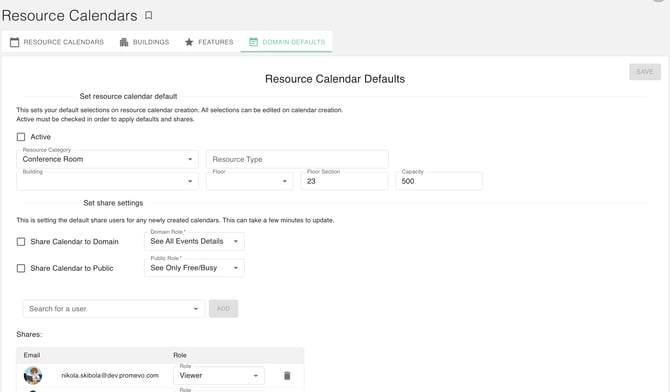
This automation allows you to apply specific details immediately upon creation, including:
- Physical Metadata: Automatically assign building locations, room categories, and floor levels.
- Operational Capacity: Define default seating limits or equipment lists (like "Projector" or "Chromebox") to keep your directory organized and searchable for end-users.
Beyond physical attributes, the Domain Defaults feature handles critical security permissions. Administrators can define domain-wide visibility and grant administrative access to specific teams or departments by default.
For example, you can ensure that the "Facilities" group always has "Manage" access to every new calendar created, while the rest of the company is limited to "See only free/busy" time.
Using Domain Defaults removes the risk of human error and saves significant administrative time. By establishing these settings, you ensure that every new asset in your organization is perfectly organized, properly secured, and ready for employees to book the moment it is created. This creates a seamless experience for IT teams and a more reliable scheduling environment for your entire workforce.