
The Calendar History feature in gPanel serves as an essential security and compliance tool, providing a detailed audit log of all actions taken on any selected calendar within your organization.
In a collaborative Google Workspace environment, calendars often contain sensitive information regarding executive schedules, internal project deadlines, and client meetings. Maintaining a transparent record of who accessed or altered this information is vital for protecting your organization's operational privacy.
The core function of Calendar History is to provide administrators with an undeniable record of activity. Rather than wondering why a meeting disappeared or who adjusted a room booking, administrators can look at the log to see the "Who, What, and When" of every change.
Each entry in the history log provides:
- Exact Timestamp: The precise Date and Time the event occurred, allowing you to sync the action with other system logs.
- The Performing User: Identification of the specific account responsible for the action, which is crucial for accountability.
- The Action Taken: A clear description of the activity — whether a user was viewing, modifying, creating, or deleting events.
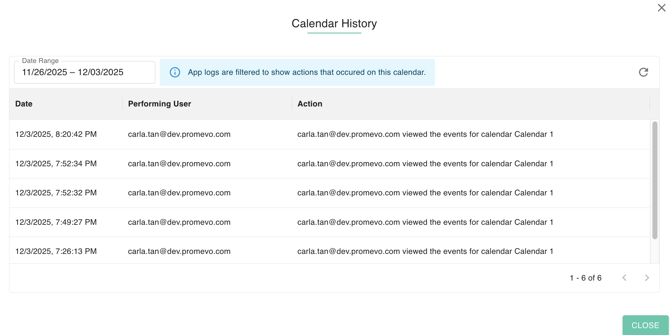
Beyond simple monitoring, this log is a powerful tool for forensic investigation. If a sensitive meeting is leaked or a critical calendar is accidentally wiped, the history log allows you to trace the incident back to the source.
To make this data manageable, the feature is fully searchable and includes a Date Range filter. This allows administrators to bypass irrelevant data and quickly narrow their focus to a specific window of time. Whether you are conducting a routine security audit or troubleshooting a scheduling conflict, these filtering tools ensure you find the answers you need without manual data sorting.
The Calendar History feature bridges the gap between simple scheduling and enterprise-grade security. By leveraging these logs, IT managers can ensure compliance with internal data policies, resolve disputes over scheduling changes, and maintain a high level of oversight across all domain-wide communications.