
Calendar Transfer Logs in gPanel serve as a comprehensive audit trail for tracking the movement of calendar data between users within your domain.
In a dynamic Google Workspace environment, the ownership of schedules, recurring meetings, and historical event data often needs to change hands. This log provides administrators with a centralized view to monitor these migrations, ensuring that critical business information is never lost during organizational shifts.
This function is primarily used to maintain data continuity during employee offboarding or departmental restructuring.
When a team member leaves the organization or changes roles, their scheduled meetings — often including vital client calls or internal project syncs — must be moved to a successor. By utilizing the transfer logs, administrators can verify that these transitions occurred successfully, preventing "orphaned" calendar events that no longer have an active owner.
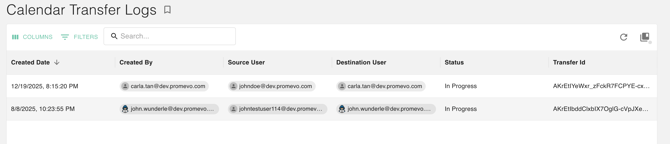
The logs also provide granular visibility into every transfer request, allowing for high-level oversight and technical troubleshooting. Each log entry includes:
-
Timestamping: View the Created Date to track when a migration was initiated.
-
Accountability: Identify the administrator in the Created By field to maintain a clear chain of command.
-
Source and Destination: Clearly see the Source User (the original owner) and the Destination User (the new owner) to ensure data is landing in the right hands.
Finally, administrators can use the Status column to monitor the health of a migration in real-time. Whether a task is "In Progress," "Completed," or "Failed," this transparency helps IT teams identify and troubleshoot stalled migrations before they impact employee productivity.
Every entry is assigned a unique Transfer ID. This ID serves as a precise reference point for internal documentation or for use when contacting technical support, ensuring that any issues can be resolved with surgical precision.
By regularly auditing these logs, your organization can ensure that its scheduling infrastructure remains intact, secure, and fully accounted for.