
In gPanel, the Create Contact feature allows administrators to manually add external individuals to a centralized organizational directory. Unlike standard Google Contacts, which are often siloed within individual user accounts, contacts created here are part of an admin-owned "System of Record."
This ensures that vital contact information—such as vendor details, contractor data, or partner lists— remains a permanent asset of the organization, independent of any single employee’s account status.
When creating a new contact, you are doing more than just entering a name and email. By utilizing Labels and Custom Fields, you are categorizing the contact for future automation. These labels act as "chips" or tags that allow you to group contacts for domain-wide synchronization.
For example, adding a "Vendor" label ensures that this contact can be automatically synced to the entire Procurement team’s mobile devices and Gmail accounts via a gPanel Contact Sync.
Step-by-Step: Adding a New Contact in gPanel Contacts
To manually provision a new external contact within your gPanel dashboard, follow these instructions:
-
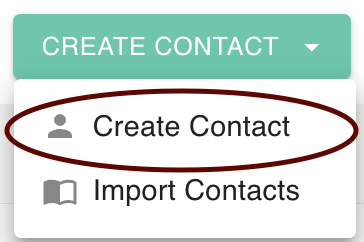
Locate the Create Contact dropdown menu and select Create Contact.
-
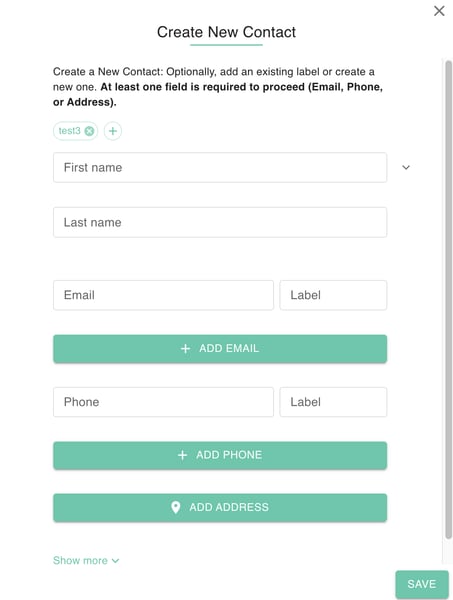
A Create New Contact Dialog Box will appear. Fill out the following fields to ensure a complete profile:
-
First Name
-
Last Name
-
Email
-
Label (this is for known and new email labels)
-
Phone
-
Label (this is for known and new Phone labels)
-
Address
-
Company Name
-
Job Title
-
Birthday
-
Website
-
Related Person
-
Custom Field
-
Notes
-
- Once all details are verified, click Save. The new contact will be added to the directory under the selected label(s) and will be ready for distribution across your domain.
By taking the time to fill out more than just the name and email, you create a richer, more searchable directory. This data depth is essential for large organizations that need to filter contacts by company, job title, or custom internal identifiers, ensuring your team always has the right information at their fingertips.