Contents
Unlike standard Google Contacts, which are often siloed within individual user accounts, gPanel Contacts serves as a centralized, admin-owned System of Record.
Located under Directory > gPanel Contacts, this tool allows administrators to "claim" external contact data currently sitting in an individual employee’s account. This ensures that vital vendor, client, or partner information remains a permanent organizational asset, protecting the domain from data loss during employee offboarding or transitions.
Understanding the Workflow
The Import Contact feature in gPanel Contacts is specifically designed to "ingest" data from a source user's existing Google Contact labels and move them into the administrative directory.
-
Source User & Label: You identify the specific user and the label (group) within their account that contains the data you wish to migrate.
-
Target Label (Optional): You can choose to instantly categorize these migrated contacts into a gPanel-managed label.
-
The gPanel Directory: If no target label is selected, the contacts are moved into the general gPanel Contacts directory, shifting them from "user-owned" to "admin-owned" status.
Step-by-Step: Importing Contacts in gPanel Contacts
To migrate contacts into your organization's system of record, follow these instructions:
- Navigate to Directory > gPanel Contacts.
-
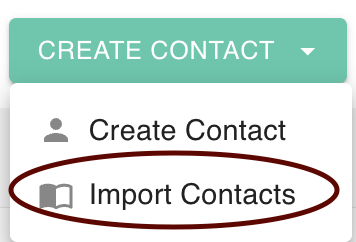
Navigate to the Create Contact dropdown menu and select Import Contact.
-
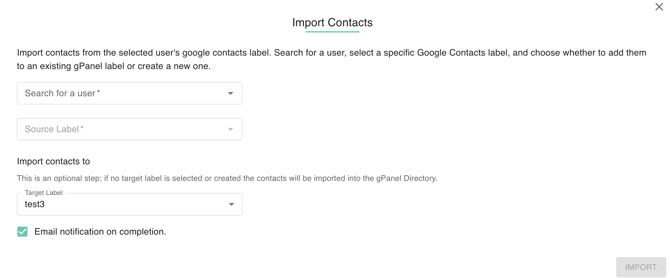
A configuration window will appear. You will need to define the following parameters:
-
Search for a user: Enter the name or email of the user who currently holds the contacts.
-
Source Label: Select the specific label from that user's Google Contacts that you wish to import.
-
Target Label (Optional): Select an existing gPanel label or create a new one to house the data. If left blank, contacts will be stored in the master gPanel Contacts directory.
-
Email Notification: Check the Email notification on completion box to receive a confirmation once the migration is processed.
-
-
Click the Import button.