
Contents
In a managed Google Workspace domain, contact labels (often used as contact groups) are more than just organizational tags — they are the blueprints for how your teams communicate with external partners and clients.
Because gPanel allows administrators to share these labels across the entire company, any change to a label’s name, membership, or sync settings can have a ripple effect across the organization.
The gPanel Contact Label History serves as your domain’s dedicated administrative audit trail. This feature is vital for "who did what, and when" tracking. Whether you are troubleshooting a disappeared contact group or auditing changes for security compliance, the history feature provides the transparency needed to maintain a reliable "Source of Truth" for your contact directory.
View Logs
To access the record of actions taken on your contact labels, follow these instructions:
- Within the gPanel Contacts module, select the label you wish to investigate and click on View Logs.
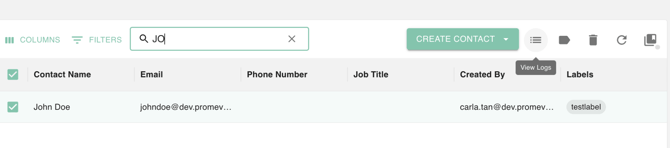
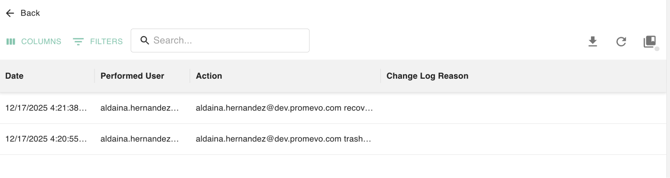
- You will be presented with a detailed list of actions performed on that specific label. This view typically includes the timestamp, the email address of the administrator who performed the action, and a description of the change (such as "Label Renamed" or "Sync Settings Modified").
Export Logs
- Click the Download/Export icon within the Logs view.
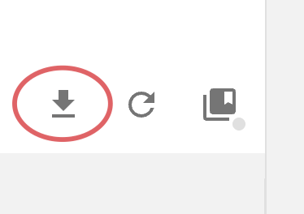
- The system will automatically generate a Google Sheet in your Drive titled “gPanel Label Log Export - [Date and Time]”. This spreadsheet allows you to filter and sort thousands of entries, making it easy to create reports for stakeholders or security audits.