In a large or growing organization, finding the right contact at the right time is essential for collaboration.
The Directory Search feature within the gPanel User Portal serves as a centralized, easy-to-navigate hub for all employees. It moves beyond a simple list of names, acting as a comprehensive "Who’s Who" for your domain.
By providing transparent access to organizational data, gPanel helps break down departmental silos and ensures that team members can connect with the exact subject matter experts they need to move projects forward.
Step-by-Step: Navigating gPanel's Directory Search
The search interface is designed for speed and precision. To find a colleague, follow these simple steps:
-
Navigate to the "Directory" tab at the top of the User Portal.
-
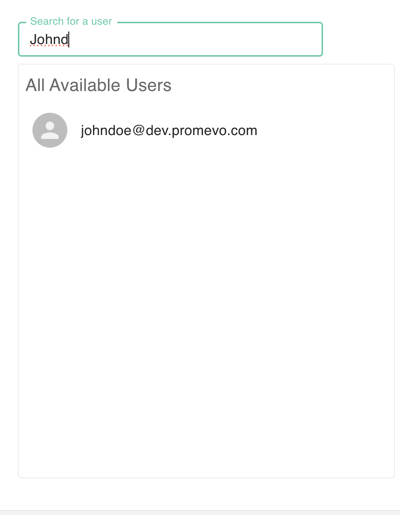
Type in either the Full Name or the Email Address of the person you are looking for.
-
As you type, the system proactively suggests all available users that match your text. This "Type-Ahead" functionality allows you to find contacts quickly, even if you only know a portion of their name.
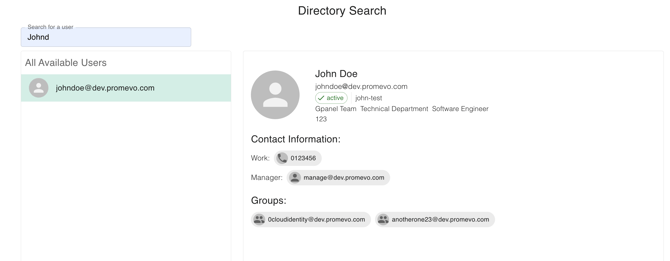
Once you select a user from the results, the system opens a detailed User Profile. This view provides a high-fidelity look at that individual’s role within the organization, including:
-
Essential Identity: Their official Name, Primary Email Address, and Account Status.
-
Organizational Context: To help you understand where they fit in the hierarchy, gPanel displays their Department, Job Title, Team, and Organization.
-
Manager & Location: You can instantly see who the user reports to and their physical or remote Location, along with their assigned Cost Center.
-
Collaborative Groups: The profile lists the various Groups the user belongs to, giving you insight into their projects or functional areas.
-
Direct Contact: Their Work Number is listed for immediate communication.