Email management is not just about keeping your inbox organized. It's increasingly about safeguarding your organization from malicious threats. Each day, businesses face the challenge of phishing attacks, or deceptive emails that masquerade as legitimate requests with the intent to steal sensitive data or spread malware.
14x Increase in AI phishing (Dec 2025)
#1 Rated Workspace Admin Platform
According to Hoxhunt, AI-generated phishing attacks are surging, with a 14x increase in December 2025 alone.
These attacks can lead to severe consequences such as data breaches, financial losses, and reputational damage. So, saying it is imperative for organizations to adopt robust email management strategies is an understatement.
Fortunately, there are comprehensive solutions available that can mitigate these risks. Leveraging advanced tools and practices, such as gPanel and its Gmail deletion feature, can significantly enhance your defenses against email-based threats.
This article will explore the nature of malicious emails, provide actionable management tips, and demonstrate how gPanel supports these efforts so your organization remains secure and resilient in the face of evolving online threats.
We believe there is always an agile solution to keep your Workspace secure, no matter how fast threats evolve.
- The gPanel Team
What Is a Malicious Email?
A malicious email, often referred to as a phishing email, is an unsolicited message designed with the intent to deceive recipients into divulging sensitive information, downloading malware, or executing fraudulent transactions.
These emails can be highly sophisticated, often mimicking the format, language, and logos of reputable organizations to trick individuals into believing they are legitimate. Common tactics include urgent or threatening language to create a sense of urgency, links to fake websites, or attachments that may contain harmful software.
"Phishing continues to be a primary attack vector for cybercrimes, significantly impacting business operations. While the effects can be slowed, careful security measures must be put in place."
2023 Phishing Threats Report, Cloudflare
The impact of malicious emails on businesses is substantial. The advent of AI to generate these campaigns has already resulted in a dramatic increase in volume and sophistication.
Malicious Email Management Tips
Effectively managing malicious emails is crucial for maintaining the security and integrity of an organization's data. Here are detailed strategies to help your organization combat these cyber threats.
01
Security Training
Equip employees with the knowledge to identify and handle phishing attempts through regular simulations.
02
Prompt Reporting
Establish clear protocols and email aliases so users can instantly flag suspicious messages.
03
System Updates
Keep operating systems patched to close vulnerabilities that malicious links might exploit.
1. Phishing Security Training
Conducting regular phishing security training is essential to equip employees with the knowledge to identify and handle phishing attempts. User-based awareness training is the most critical line of defense against phishing attacks.
However, no training package can teach users to spot every phishing attempt. Therefore, training should be supplemented with technical security measures.
2. Prompt Communication
Establishing a protocol for prompt communication is vital when dealing with potential phishing threats. If one employee receives a malicious email, it is crucial to inform the entire organization as quickly as possible.
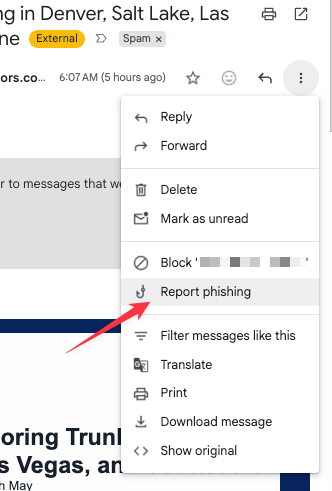
3. Reporting Emails as Spam to Gmail
Encourage employees to report suspicious emails as spam within Gmail. When an email is manually moved to the Spam folder, Google receives a copy and may analyze it to help protect users from spam and abuse.
4. Using Secure Operating Systems
Maintaining secure operating systems is a fundamental aspect of email security. Ensure that all systems are regularly updated and patched to close any vulnerabilities that phishing emails might exploit.
5. Utilizing Email Management Tools & gPanel®
Implementing email management tools such as gPanel® can significantly enhance an organization's ability to manage and mitigate malicious emails.
gPanel® offers features like centralized Gmail deletion, allowing administrators to quickly remove harmful emails from user inboxes before they can cause any damage.
How gPanel® Supports Malicious Email Management
| Security Feature |
Starter |
Standard |
Enterprise |
| Centralized Gmail Deletion |
✅ |
✅ |
✅ |
| Signature Management |
✅ |
✅ |
✅ |
| Advanced Security Logs |
❌ |
✅ |
✅ |
gPanel is the #1 rated Google Workspace administration platform, providing robust email management capabilities. One of its standout features is the Gmail deletion tool, which allows administrators to swiftly delete malicious emails across all user accounts.
Product Update
Deep Dive: Centralized Gmail Deletion in gPanel
Learn how to instantly remove malicious threats from every inbox in your domain.
Get Started With gPanel
Navigating the complexities of email management is vital to defending your organization against phishing and malicious emails. gPanel's Gmail deletion tool offers a robust solution for swiftly removing harmful emails.
Schedule your gPanel demo today and discover firsthand how this powerful tool can empower your IT team.







 User Management
 Group Management
 OU Management
 Gmail Management
 Drive Management
 Calendar Management
 Device Management
 Workspace Reporting
 Workspace Automation
 Billing & License Management



 Christine Page

 Brandon Carter : Aug 5, 2023, 5:00:00 AM

 Christine Page