When a finance team or new CIO looks at the monthly software ledger, the last thing you want to hear is: “Why on earth are we paying so much for Google Docs?”
It's an understandable reaction if you view Google Workspace as just a set of web-based productivity apps. But in an enterprise environment, you aren't paying for a document editor; you are paying for an enterprise identity, security, storage, compliance, and communication platform built directly into your corporate domain. Each Google Workspace account represents a licensed seat that unlocks Gmail, Drive, Meet, device controls, and security policies tied to your organization.This operational reality matters deeply to Workspace admins, IT leaders, and finance or procurement directors who carry accountability for:
 Headcount changes
- Software budgets
- Contract renewals
- Compliance standards.
As an organization grows past 500 or 5,000 employees, billing stops being a simple credit card charge that hits every 30 days. It becomes a complex web of commitment rules, prorated adjustments, reseller agreements, and seat management mechanics.
When IT and finance lack visibility into this web, the company ends up overpaying for dormant accounts, getting surprised by mid-cycle invoice spikes, or worse, facing sudden service suspensions.
Here's what actually drives your invoice: four separate billing systems, two contract models, and a proration engine that recalculates by the day.
The 4 Things "Billing" Actually Means in Google Workspace
Part of why Google Workspace billing can create so much confusion for enterprise finance teams is that "billing" isn't a single setting inside the Google Admin Console.
It refers to four distinct, interconnected systems that control how you are charged, who owns the financial relationship, and how subscriptions behave over time.
-
The Account
This defines who legally owns the payment structure. It ties your Google Workspace domain to legal entity details, billing contacts, and your primary country or tax region.
- The Payments Profile
This stores your official tax identity, corporate billing address, tax registration numbers (like VAT or EIN), and currency configurations used on official invoices.
- The Payment Method
This controls how Google (or your reseller partner) actually collects funds. This ranges from primary corporate credit cards and direct debit (ACH) to invoicing terms for qualified enterprise accounts.
- The Subscription
This defines what services you are actually purchasing, including your core Workspace edition (e.g., Business Plus, Enterprise Standard), total allocated seat count, add-on services (Google Voice, extra storage), and contract term rules.
When an invoice changes unexpectedly, it is rarely a random error by Google. It is almost always caused by an unmonitored shift in one of these four underlying layers.
Comparing Flexible Plan vs. Annual/Fixed-Term Plan: Which is Right for You?

When setting up or renewing Google Workspace, organizations must choose between two primary contract models: the Flexible Plan and the Annual/Fixed-Term Plan.
While they look straightforward on paper, they behave very differently when headcount expands or contracts.
The Flexible Plan
The Flexible Plan is a pay-as-you-go model. You are billed monthly for the exact number of user licenses assigned or reserved during that billing cycle.
- The Advantage: Maximum agility. If you offboard 50 contractors today, your bill decreases on the next billing cycle.
- The Trade-off: You pay a higher per-seat rate compared to annual commitments.
The Annual/Fixed-Term Plan
The Annual or Fixed-Term Plan locks in a discounted per-seat price for a full 12-month (or multi-year) commitment.
- The Advantage: Lower per-user cost and predictable unit pricing for annual budgeting.
- The Trade-off: You commit to a minimum threshold of licenses.
The single biggest mistake finance teams make is assuming an annual contract freezes their total monthly invoice amount. In reality, an annual commitment locks the per-seat price structure, not user behavior.
If you add 100 new employees mid-contract, your monthly spend increases immediately to cover those new seats at the locked rate. However, if you reduce your headcount by 100 users mid-contract, you are still obligated to pay for your committed seat baseline until the renewal window opens.
What’s the Difference Between Buying Direct from Google vs. Through a Reseller?
How you buy Google Workspace fundamentally alters your administrative experience, payment options, and support path. Organizations can purchase directly online from Google using a credit card or line of credit, or buy through a certified Google Diamond Partner like Promevo, the creators of gPanel.
Here is how the two procurement paths compare across operational touchpoints:
- Who can adjust your billing cycle: Direct accounts manage cycles strictly through standard self-service options in the Admin Console. Partner resellers generally have more flexibility to align billing terms, custom invoicing schedules, and PO-based payment structures with your internal procurement calendar.
- Who controls Admin Console access: Direct accounts keep administrative control 100% internal. Partner reseller arrangements establish a secure reseller relationship that allows certified partner engineers to assist with backend troubleshooting, licensing adjustments, and deployment projects when requested. Here’s a quick overview of everything that resellers can access in your Admin console.
- Refund/cancellation rules: Direct purchases strictly adhere to Google’s standard self-service terms of service. Partner contracts allow for more tailored enterprise agreements and custom co-termed commitments.
- Support path: Direct customers open tickets through the general Google support portal, where response times vary by tier. Partner customers bypass general queues, routing billing, licensing, and technical Workspace tickets directly to specialized partner support teams who know their specific infrastructure.
- Value-added bundling: Google sells the standalone platform. Diamond Partners frequently bundle value-added software, such as gPanel for advanced administration, alongside migration services, security health checks, and change management programs that maximize your cloud investment.
If you're weighing which admin tools are worth bundling in, it's worth seeing how gPanel stacks up against other Google Workspace administration software.
7 Billing Headaches Every Google Workspace Admin Knows Too Well
If managing Google Workspace billing feels like a chore, you aren't alone. IT administrators and finance teams routinely run into systemic friction points when scaling their environments.
-
The Payments Profile Verification Delay
You set up a new domain or update company billing details, only to trigger an automated verification hold. Google requests legal documentation to verify the payments profile, leaving your billing state in limbo while services run the risk of restricted access.
 Surprise Suspensions After a Failed Charge
A corporate credit card expires, hits its credit limit, or gets flagged for fraud by a bank. If the charge fails and primary admins miss the notification window, Google automatically suspends the entire domain, cutting off access to Gmail, Drive, and Meet for every employee until payment is resolved. - Mystery Storage Charges After an Edition Upgrade
An admin upgrades selected users or switches Workspace tiers, only to see unexpected storage or add-on line items on the next statement. The invoice reflects pooled storage policy shifts or add-on resets that weren't clearly understood during the initial upgrade.
- No Easy Way to Mix Subscription Tiers Across Users
An organization wants frontline factory workers on a low-cost edition (like Business Starter) while giving executives Enterprise features. Navigating partial domain licensing (PDL) rules inside standard setups can create structural headaches and administrative overhead.
- Invoices That Don't Match What You Expected to Pay
An invoice arrives higher than budgeted because prorated charges from mid-month user additions, add-on licenses, and timing adjustments are merged into aggregated totals that don't map cleanly to internal department codes.
- Tracking Down Who Actually Approved a License Purchase
A helpdesk tech or regional admin adds 20 new licenses to resolve immediate onboarding tickets. Weeks later, finance asks who authorized the budget increase, but standard console logs make it tedious to trace who triggered the seat expansion.
- Tax ID and VAT Headaches That Hold Up Setup
Entering corporate tax details in certain global regions requires precise formatting. If an EU VAT number or regional tax ID doesn't validate instantly against Google's system, invoice generation stalls or incurs unexpected tax assessments.
10 Ways gPanel Helps with License Visibility (& Where It Doesn't Touch Your Bill)
gPanel doesn't touch your Google Workspace bill directly. It does not directly alter, collect, or process your Google Workspace bill. You still pay Google or your partner reseller for your licenses.
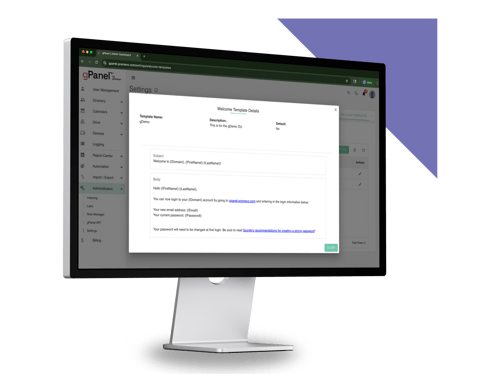
Where gPanel actually helps is centralized visibility into your domain's subscriptions and automated user management for the tasks that drive those costs. It acts as an administrative lens that eliminates license waste and prevents surprise overages.
-
Centralized Subscriptions Overview: View all Google Workspace subscriptions, purchased seat quantities, and allocated licenses across your domain in a single, clean interface.
- Proactive License Threshold Alerts: Configure custom notification alerts when license usage approaches your purchased capacity, preventing unexpected onboarding delays or sudden seat overages.
- Deep Inactive Account Reporting: Run detailed activity reports that go beyond last login dates to track Gmail, Drive, and Meet usage over extended periods to easily spot dormant accounts holding paid seats.
- Bulk License Reassignment: Reassign, add, or remove user licenses across large groups or Organizational Units (OUs) in a single action, eliminating tedious manual work in the Admin Console (or the command-line scripting many admins still lean on with GAM).
- Automated Offboarding License Reclamation: Embed license removal and reallocation straight into your custom deprovisioning workflows so former employee seats are instantly reclaimed when staff depart.
The other half of that same offboarding moment is reassigning ownership of that person's Drive files before the license is pulled, so nothing gets orphaned along with the seat.
- Centralized Payment Method Management: Maintain and update payment options directly within gPanel to ensure seamless renewals and eliminate accidental payment failures.
- Automated Subscriptions Auto-Pay: Easily enable and manage auto-pay settings across active Workspace subscriptions to streamline recurring billing cycles.
- Designated Billing Contact Controls: Manage specific billing contact access within gPanel, ensuring finance and procurement leads have appropriate administrative oversight without granting them full super admin access.
- Audit Logs for Admin Billing Activity: Maintain clear historical audit logs showing administrative actions, such as who added licenses or modified payment contacts and when those changes occurred.
- Structured Renewal Planning Data: Combine long-term user activity reports with current seat counts to make data-driven decisions during annual contract renewal reviews.
Ready to Stop Babysitting Your Billing? See gPanel in Action
Billing headaches rarely stem from pricing structure alone. They stem from visibility gaps, such as:
- Not knowing how many licenses are sitting idle
- Who added extra seats mid-month
- Which accounts need to be decommissioned during offboarding
gPanel helps bridge the gap between Google Workspace's potential and its administrative reality. By automating seat reassignment and providing robust domain reporting, gPanel helps IT and finance leaders shift from reactive invoice cleanup to proactive, intelligent management.
Schedule a demo of gPanel today to see how easy license management can be.
6 Keys to Prepare for Renewal Before Your Options Narrow
Contract renewals don't fail because IT teams lack technical skills; they fail because no one owned timing, license cleanup, or decision alignment before the renewal window closed. Follow these six steps to protect your budget before your Workspace contract locks in.
-
Confirm your commitment end date and seat count 
Verify your exact contract expiration date and baseline committed seat count inside your Admin Console or reseller agreement. Setting a calendar reminder 90 days out prevents automated commitment renewals from triggering unexpectedly.
- Audit inactive/unused licenses before renewal
Run an audit to uncover dormant accounts, former employees who were improperly offboarded, or test accounts holding paid licenses. Deprovision or reassign those seats before locking in another 12-month commitment.
- Know your reseller vs. direct renewal process
Clarify whether your renewal is managed directly through Google or routed through a partner like Promevo. Partner renewals often open up opportunities for co-termed licensing, custom payment schedules, or value-added services.
- Auto-renewal triggers automatically with a valid payment method on file
Remember that Google Workspace plans are designed to auto-renew by default if an active payment method exists on file. If you plan to adjust committed seat counts, you must submit those changes before the auto-renewal date.
- Document who owns the renewal decision internally
Establish clear decision-making authority across IT, finance, and procurement. Prevent renewal delays caused by internal confusion over who holds budget approval.
- Align license tiers with actual department needs
Audit user activity to confirm that employees assigned to high-tier Enterprise licenses are actively utilizing advanced features. Downgrade light users to lower tiers where appropriate to optimize spend.
Why Your Google Workspace Invoice Changes Month-to-Month (& How to Take Back Control)
If your monthly statement fluctuates unpredictably, the table below maps common invoice drivers directly to their operational impact and practical solutions.
|
Issue
|
Impact
|
Solution
|
|
New users added mid-cycle
|
Prorated charges appear on the next invoice unexpectedly
|
Track license additions in real time
|
|
Edition or plan switch
|
Storage or feature costs shift without clear notice
|
Review edition comparisons before switching
|
|
Annual contract renewal
|
Full seat count rebills even with inactive users
|
Audit seat usage before the renewal window closes
|
|
Currency or tax rate changes
|
Invoice totals fluctuate for reasons that aren't obvious
|
Monitor billing settings tied to your region
|
|
Add-on services (storage, Voice, etc.)
|
Charges stack on top of the base subscription quietly
|
Centralize add-on tracking alongside core billing
|
How to Actually Read a Google Workspace Invoice
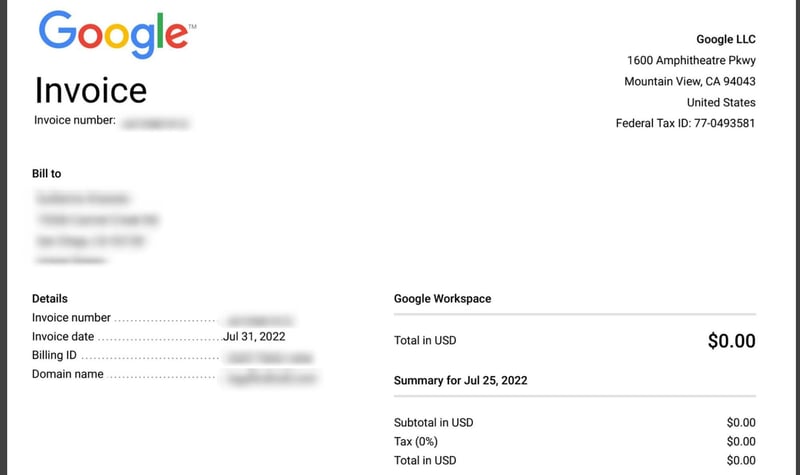
Most finance teams misread Google Workspace invoices because they expect itemized, user-by-user line items. They want an invoice that lists every employee by name alongside their individual $12 or $18 seat charge.
Google does not structure invoices that way.
Instead, Google groups charges by edition and subscription type, rolling multiple user licenses into a single aggregated line item. For example, if you have 500 employees on Enterprise Standard, your invoice displays a single line item for Enterprise Standard showing a pooled quantity of 500 and a total sum.
This creates a common accounting blind spot. A finance controller compares active HR headcount against the invoice summary, sees a mismatched single total, and assumes the billing is incorrect. In reality, the invoice reflects pooled licensing assigned under a unified subscription tier.
Mid-cycle adjustments get calculated the same way, by the day. Say you're on 500 Enterprise Standard seats and add 3 more on the 10th of a 30-day month: your invoice shows the base line item for 500 seats at the full rate, plus a separate prorated line item for those 3 seats charged for the 20 remaining days, not the full month. Google's own billing documentation confirms proration runs on exactly this day-by-day basis.
The 9 Most-Asked Questions About How to Set Up Billing the Right Way
Don’t worry if you still have questions about billing in Google Workspace; lots of administrators need help navigating their invoices.
-
Who is allowed to set up billing for our organization?
Only users assigned Super Admin privileges or custom admin roles with explicit Billing permissions in the Google Admin Console can configure or edit billing settings.
- Can we change our billing country or currency after setup?
No, not on the existing profile. Google's own support documentation is direct about this: once billing is set up, the country and currency on that profile can't be changed. Your only path to a different country or currency is standing up a new billing profile, which a Google Workspace Diamond Partner like Promevo can help you migrate to without starting your Workspace deployment over.
- What happens if our payment method is declined?
Google places the account into a grace period and keeps trying the payment method. If it's not fixed by the beginning of the following month, the account is suspended.
- Is it possible to pay annually instead of monthly?
Yes. Annual commitments are available for most Workspace editions. Enterprise domains often execute annual or multi-year invoicing agreements directly or through a partner reseller.
- How do we add a backup payment method?
In the Admin Console under Billing > Payment Accounts, you can add a secondary credit card or bank account designated as a backup to prevent automated suspensions if your primary method fails.
- Do we need to enter a VAT or tax ID during setup?
Yes. In many international jurisdictions (including the EU and UK), entering a valid tax registration ID is required for correct tax exemption and invoice formatting.
- Can different departments be billed separately?
No. All subscriptions within a Google Workspace domain roll up into a single primary billing account.
- What's the difference between a payment profile and a payment method?
A payment profile stores legal corporate identity details, tax IDs, and billing addresses. A payment method is the actual credit card, ACH bank connection, or credit line used to process payment.
- Why does my invoice include charges I didn't explicitly approve?
Because Google Workspace applies prorated billing for mid-cycle seat additions and auto-renews active subscriptions by default, charges can increase automatically whenever an admin adds seats or upgrades user features.
Manage Smarter, Not Harder: Get a Google Workspace License & Renewal Review
Google Workspace billing complexity doesn't come from the software itself. It comes from a lack of visibility across user accounts, license assignments, and contract timelines.
gPanel brings clarity to your cloud footprint, helping IT and finance teams eliminate seat waste, streamline renewals, and regain control over their Workspace spend.
The real test comes at your next renewal: pull a usage report 90 days out, and see how many of your committed seats are actually being used.
Looking to walk through your specific seat count? Schedule a personalized gPanel demo or try our interactive experience today.




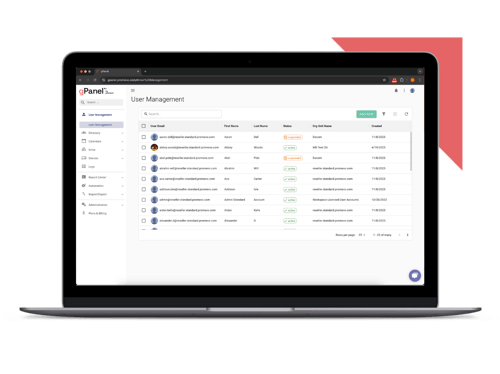
 User Management
 Group Management
 OU Management
 Gmail Management
 Drive Management
 Calendar Management
 Device Management
 Workspace Reporting
 Workspace Automation
 Billing & License Management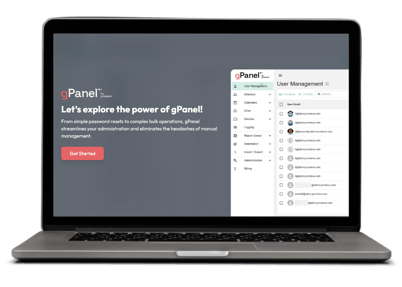


 John Pettit

 John Pettit : Nov 21, 2024, 5:00:00 AM