Google Apps Manager (GAM) has long been the "Swiss Army Knife" for IT administrators, offering deep API access and command-line control far beyond the native Google Admin Console.
 However, as Google Workspace environments grow (often spanning multiple domains and thousands of users), the limitations of a script-heavy strategy become clear.
In complex sectors like finance, healthcare, and higher education, relying on a single Google Workspace admin to manage mission-critical scripts creates a "single point of failure."
For instance, a manual offboarding error or a broken script can leave sensitive data exposed in Google Drive long after an employee has left.
Modern IT teams are moving toward GUI-based alternatives to gain SOC 2-certified security, real-time audit trails, and no-code automation that scales without the fragility of local environments.
10 Hidden (& Avoidable) Risks to Look For Before You Commit: Evaluating GAM Alternatives on Technical Expertise + More
Choosing a Google GAM alternative software is a high-stakes decision for your operational efficiency. While some Workspace management tools promise simplicity, they may introduce risks that only surface after you've retired your scripts.
These risks often determine whether that software ultimately reduces operational overhead or increases it:
-
Sacrificing Power for Simplicity
Don't let a clean UI fool you into losing functionality. Ensure your new platform still handles high-volume bulk actions, API integrations, and the granular advanced permissions management you’re used to in GAM.
- Locking Your Team Into a Code-Dependent Workflow
Many organizations switch tools specifically to reduce code dependency. If your "no-code" tool actually requires you to write partial scripts just to get a basic workflow running, you haven't actually solved the problem.
- Underestimating Your Bulk Operation Needs
As your business grows, you need to be able to run bulk operations and build automations for your Google Workspace domain at scale. A true alternative to GAM must support mass changes to Google Groups, multi-user policies, and the entire employee lifecycle in clicks, not hours.
- Choosing a Tool Tied to a Single Machine
Because GAM is a command-line tool, administrators can only access the platform from their local device or on a virtual machine. Modern administration should be browser-based and centralized so the whole team has visibility, regardless of where they are working.
 Overlooking Automation and Scheduling Capabilities
It’s not enough to execute a task once. Look for GAM alternatives that offer trigger-based automation and conditional logic that can handle real-time remediation when a security violation occurs.
- Flying Blind Without Reporting and Audit Trails
Script execution alone doesn't provide an audit history. You need centralized reporting that flags risky permissions and external sharing exposure before they become headlines.
- Skipping Security and Compliance Certifications
In regulated industries, "it works" isn't enough. Verify your vendor’s SOC 2 certification, GDPR compliance, and data retention controls to satisfy your legal and security teams.
-
Ignoring Integration With Your Existing Systems
Your Workspace doesn't live in a vacuum. Your tool should integrate seamlessly with third-party applications, including:
- Identity providers
- HR systems
- Ticketing platforms
- Security tooling
- SIEM environments
- Workflow automation systems
- Undervaluing Vendor Support and Documentation
Scripts depend on "tribal knowledge". When you move to a GAM alternative, you should expect professional documentation, implementation guidance, and responsive training resources.
- Ignoring Long-Term Administrative Scalability
Some Google Workspace admin tools struggle with multi-domain administration or large user populations. Evaluate for long-term growth from day one so you don't have to switch platforms again in two years.
60-Second Summary: Here's Your GAM Alternative Cheat Sheet
Organizations evaluating Google GAM alternative software often compare platforms based on key administrative workflows such as automation, reporting, and governance.
Feature
|
Zenphi |
Patronum |
GAT Labs |
CloudM |
gPanel |
|
No-Code Interface
|
✔ |
✔ |
✔ |
✔ |
✔ |
|
Bulk User Operations
|
✔ |
✔ |
✔ |
✔ |
✔ |
|
Workflow Automation
|
✔ |
✔ |
✔ |
✔ |
✔ |
|
Real-Time Monitoring & Alerts
|
✔ |
✔ |
✔ |
CloudM Migrate only
|
✔ |
|
Drive & Gmail Auditing
|
✔ |
❌ |
✔ |
✔ |
✔ |
|
User Lifecycle Management
|
✔ |
✔ |
✔ |
✔ |
✔ |
|
License & Billing Management
|
❌ |
✔ |
❌ |
✔ |
✔ |
|
Migration Tools
|
✔ |
✔ |
✔ |
✔ |
❌*
|
|
Multi-Domain Support
|
✔ |
✔ |
✔ |
✔ |
✔ |
|
SOC 2 Compliant
|
✔ |
❌ |
✔
|
✔ |
✔ |
|
Google Marketplace Listed
|
✔ |
✔ |
✔ |
✔
|
✔ |
|
API Integrations
|
✔ |
❌
|
✔ |
✔ |
✔
|
|
Product Bundling
|
All features available within a single Zenphi subscription at the appropriate tier. |
Two tiers offered at different price points: Patronum and Patronum+. Backup is available as an additional add-on. |
Full capability requires purchasing GAT+ as a base, then adding Unlock, Flow, Shield, and FlowHR separately depending on use case. |
Features are bundled into three different packages — Automate & Protect, Migrate, and Business Continuity. Each bundle has a different pricing model. |
All features available within a single gPanel subscription at the appropriate tier; no separate purchases required to unlock core functionality.
|
*While gPanel doesn't directly offer migration tools, its Google Workspace automation capabilities do support the bulk uploading and updating of your Google Workspace data, streamlining your Google Workspace migration and adoption.
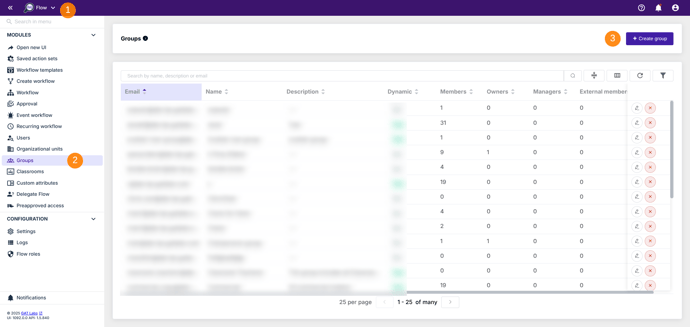
GAT Labs focuses heavily on security visibility, compliance monitoring, and browser-level protection.
- Key Strength: Real-time DLP (Data Loss Prevention) and auditing for both Gmail and Drive.
- Governance: Appeals to organizations that prioritize oversight and require multi-party approval workflows for sensitive admin tasks.
- Reporting: Provides critical insights into user activity and file usage patterns that help inform strategic decisions.
“The level of detail and clarity in [GAT Labs’] reports impressed not just me, but also my entire leadership team. We were able to get critical insights into data access, user activity, and file usage patterns that helped inform strategic decisions across departments.”
- Stephanie K on G2
| Trait |
Google GAM
|
GAT Labs |
|
Interface
|
Command-line only
|
GUI-based, no-code
|
|
Security & Auditing
|
Limited, manual reporting
|
Real-time DLP, Drive and Gmail auditing
|
|
Compliance Certifications
|
None
|
SOC 2 certified, GDPR compliant
|
|
Access Controls
|
Single admin execution
|
Multi-party approval workflows
|
|
Operational Visibility
|
Script generated
|
Centralized real-time monitoring
|
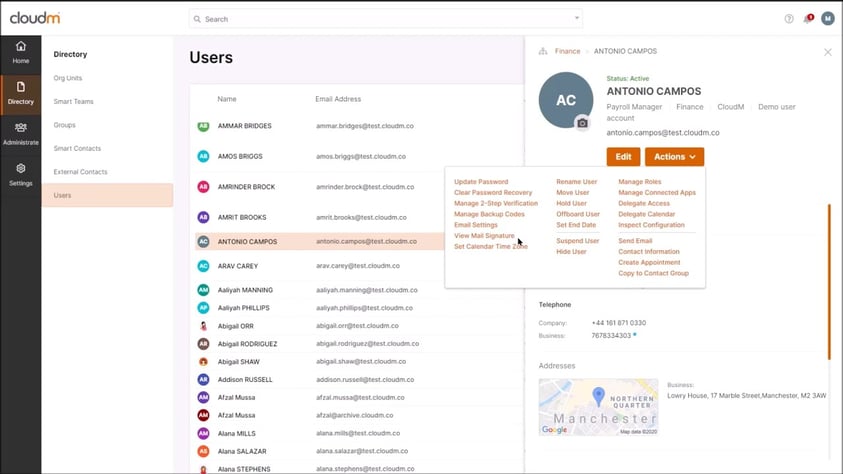
CloudM is a popular GAM alternative for organizations actively migrating into Google Workspace from other platforms.
- Key Strength: Comprehensive migration tooling combined with built-in archiving and compliance features.
- Interface: Provides a centralized, GUI-based platform to manage administration workflows across Google Workspace and Microsoft 365.
“CloudM simplifies the migration process with an intuitive interface and clear step-by-step guidance. Their support team is knowledgeable and responsive.”
Parth S., Systems Administrator on G2
| Trait |
Google GAM |
CloudM |
|
Interface
|
Command-line only
|
GUI-based, no-code
|
|
Migration Capabilities
|
None
|
Full migration tooling across platforms
|
|
Platform Scope
|
Google Workspace only
|
Google Workspace, Microsoft 365, and more
|
|
Archive & Compliance
|
None
|
Built-in archiving and compliance features
|
|
Lifecycle Management
|
Script-based execution
|
Centralized administration workflows
|
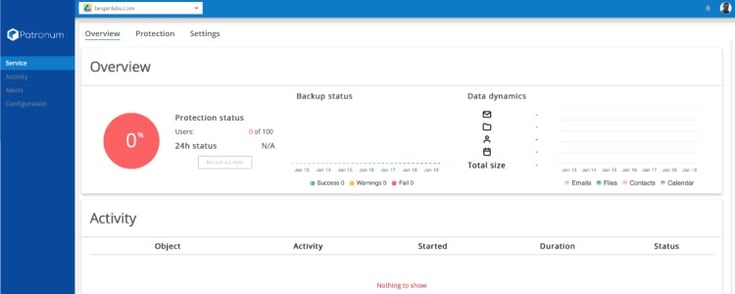
Patronum emphasizes operational consistency without the complexity of scripting.
- Key Strength: Automated domain-wide email signature management and Google Contacts syncing.
- Lifecycle: Features policy-driven automation for onboarding and offboarding workflows to keep permissions clean.
“I had searched for months for a way to organize our company's folder and drive system and set it up with appropriate permissions that allowed for transparency and security while we scale. Patronum makes all of this easier!”
- Lara Pienaar on the Google Workspace Marketplace
| Trait |
Google GAM |
Patronum |
|
Interface
|
Command-line only
|
GUI-based, no-code
|
|
Email Signature Management
|
Not supported
|
Automated domain-wide signature templates
|
|
Onboarding & Offboarding
|
Manual script execution
|
Automated lifecycle workflows
|
|
Google Contacts Management
|
Not supported
|
Automated sharing and sync across domain
|
|
Administrative Model
|
Manual execution
|
Policy-driven automation
|
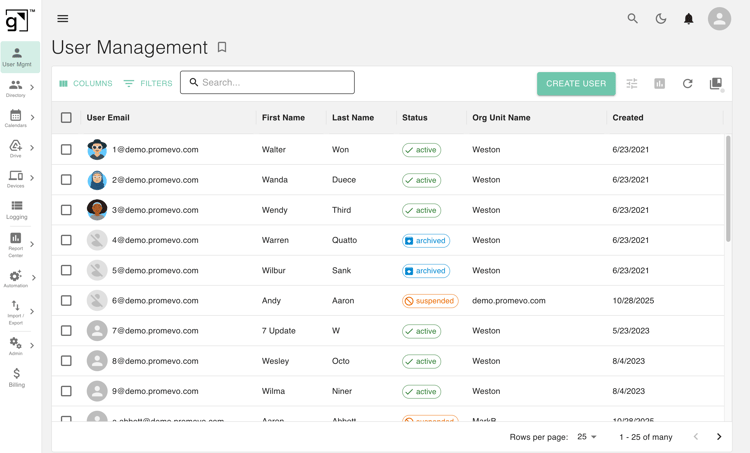
gPanel bridges the gap between Google Workspace potential and administrative reality. It is specifically designed for organizations in finance, healthcare, and education that need to eliminate human error in manual account management.
- Key Strength: Specialized "Search & Sweep" capabilities that expose "devious" security risks hidden deep in Google Drive.
- Automation: Features a robust Rules Engine for if/then workflows and processes bulk administration across hundreds of accounts in clicks.
- Visibility: Offers 70+ custom reports and real-time audit trails for total operational transparency.
“gPanel was the final piece that allowed our successful transition to Google Workspace. Without it, we would have struggled to perform the administrative tasks we needed, such as centralized [email] signature management, group management policies, automated onboarding policies, etc.” - Tim Dickson, Director of Technology at
Auberge Resorts Collection
| Trait |
Google GAM
|
gPanel |
|
Interface
|
Command-line only
|
GUI-based, no-code
|
|
Automation
|
Manual command execution
|
Rules Engine with if/then workflow automation, custom admin policies, API access
|
|
Reporting & Visibility
|
Basic, manually generated
|
Real-time reports, audit trails, activity logs
|
|
License & Billing Management
|
Not supported
|
Centralized license purchasing and cost monitoring
|
|
Operational Scalability
|
Script-dependent
|
Structured automation at scale
|
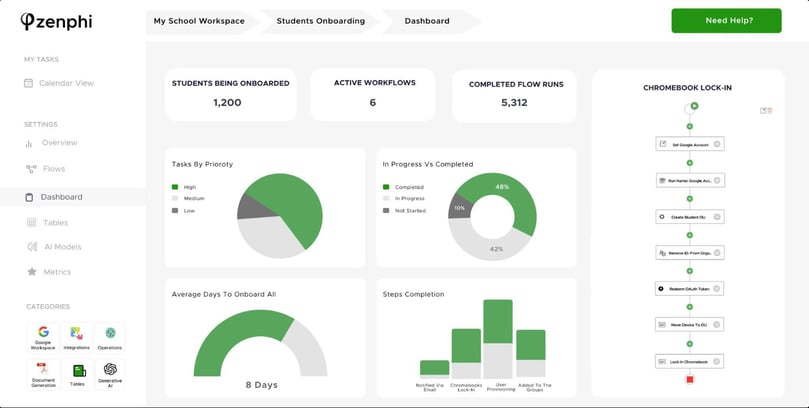
Zenphi is a no-code automation powerhouse built for non-technical users across various departments.
- Key Strength: A drag-and-drop workflow builder that automates cross-functional business processes for HR, Finance, and Legal.
- Complexity: Supports multi-step, conditional logic to manage complex business operations beyond simple admin tasks.
“The user-friendly drag-and-drop interface allows my team to quickly build workflows, and the ability to trigger actions based on real-time data is a massive time-saver.” - Suzy R., Software Engineer in the Logistics & Supply Chain industry on
Capterra
| Trait |
Google GAM |
Zenphi |
|
Interface
|
Command-line only
|
Drag-and-drop workflow builder
|
|
Automation Scope
|
Admin tasks only
|
Cross-application business process automation
|
|
Technical Requirement
|
Scripting knowledge required
|
No-code, built for non-technical users
|
|
Workflow Complexity
|
Single-step command execution
|
Multi-step, conditional workflow logic
|
|
Operational Focus
|
Direct admin execution
|
Cross-functional process automation
|
Real Customer Feedback: How gPanel Stands Apart as the Premier GAM Alternative
The true measure of a GAM alternative is validated by customer testimonials, not technical comparisons. Here is some direct, unedited feedback from IT directors and Google Workspace managers who successfully implemented gPanel.
“The best single feature of gPanel is the Google Drive integration. Not even the admin console gives you the ability to scan through files -- that's a case for GAM which is a pain because it requires super admin access. But with gPanel, admins and the helpdesk can quickly find files and folders and verify the location and change sharing.”
- Frej Krook, Google Workspace Manager for Trimble on G2
“Overall, [gPanel] makes supporting Google Workspace administration much easier. I am glad we use gPanel and because of it we were able to move away from GAM.”
- IT Director on Sourceforge
The Top 8 Risks of Choosing an Inferior Tool for Bulk Operations
As your organization scales, the ability to execute changes across thousands of accounts simultaneously becomes the backbone of your IT strategy.
Google Apps Manager provides this via command line, but many teams seeking alternatives overlook how vital a robust bulk engine is for maintaining security, governance, and operational speed.
Without a high-performance bulk processing architecture, your "automation" tool can quickly become a bottleneck, introducing significant risk to your Workspace domain.
- Irreversible Changes With No Audit Trail: Bulk actions without logging or rollback visibility can create nightmare compliance problems.
- Inadequate Access Controls Across Admin Role: Relying on single-admin execution creates a dangerous concentration of risk; your platform should instead support role separation, granular approvals, and centralized governance.
- No Real-Time Monitoring or Alerts: You need immediate visibility into failed workflows, risky sharing changes, and lifecycle errors to ensure bulk tasks actually complete as intended.
- Tool Abandonment and Community-Only Support: Depending on community-supported tooling is a gamble; if documentation becomes outdated or support disappears, your bulk administration strategy dies with it.
- API Quota Exhaustion at Scale: Large environments generate massive activity; the right platform must manage API utilization efficiently to prevent disrupting your entire domain's operations.
- Poor Offboarding Leaves Data Exposed: Weak or slow lifecycle automation often leaves sensitive permissions or files exposed long after an employee departs.
- Hidden Costs as Your User Count Grows: As your user count grows, the cost of administration skyrockets if your tool requires constant manual intervention or custom script maintenance.
- Fragmented Reporting Across Multiple Systems: Disconnected reporting across multiple systems creates blind spots in your security posture and lifecycle administration.
7 FAQs: How to Manage Google Workspace After You Leave the Command Line
Organizations moving away from GAM often ask similar questions about migration, compatibility, and operational impact.
- Is GAM Still Worth Using Today?
GAM still provides powerful direct API access for highly technical administrators and smaller environments. Many larger organizations move toward GUI-based platforms as operational complexity increases.
- Can I Use a GAM Alternative Alongside the Native Google Admin Console?
Yes. Most Google GAM alternative software platforms work alongside the native Google Admin Console and extend its capabilities through automation, reporting, and governance features.
- How Long Does It Take to Migrate From GAM to a GUI-Based Tool?
Migration timelines vary depending on environment size, lifecycle complexity, existing scripts, and governance requirements. Many organizations phase implementations gradually.
- Do GAM Alternatives Work for Google Workspace for Education?
Yes. Many platforms specifically support education environments with lifecycle automation, compliance visibility, bulk administration, and multi-domain management capabilities.
- Why Do Organizations Replace Script-Based Administration?
Organizations often move toward structured platforms to reduce operational fragility, improve visibility, centralize automation, and decrease dependency on manual execution.
Organizations often retire some scripts, keep others temporarily, or translate workflows into platform-based automation. The transition approach depends on operational complexity.
- Are GAM Alternatives Suitable for Multi-Domain Environments?
Many modern administration platforms support multi-domain visibility and centralized management across complex Workspace deployments.
- Why Do Organizations Replace Script-Based Administration?
Organizations often move toward structured platforms to reduce operational fragility, improve visibility, centralize automation, and decrease dependency on manual execution.
Ready to Find Your Best GAM Alternative? Here's Where to Start
The move away from command-line administration is a significant step toward operational maturity. Replacing fragile, person-dependent scripts with a structured platform reduces operational fragility and ensures that your Google Workspace governance is proactive rather than reactive.
Whether you prioritize the cross-functional business automation of Zenphi, the migration-first focus of CloudM, or the deep security and auditing of GAT Labs, the goal is the same: spend less time maintaining code and more time managing outcomes.
For teams that need a balance of Drive governance, bulk administration, and SOC 2-certified visibility, gPanel by Promevo offers a Workspace-native solution that makes managing hundreds of accounts.
Ready to see how structured automation can transform your Workspace? Schedule a gPanel demo or try our interactive experience today.







 User Management
 Group Management
 OU Management
 Gmail Management
 Drive Management
 Calendar Management
 Device Management
 Workspace Reporting
 Workspace Automation
 Billing & License Management



 John Pettit

 John Pettit : Jul 17, 2025, 5:00:00 AM