Data doesn’t just live in your environment anymore. It moves across users, devices, apps, and external collaborators every day.
That flexibility drives productivity, but it also expands your risk surface fast. Google Workspace security gives you a strong foundation.
Google invests heavily in infrastructure, encryption, and threat detection. That baseline matters. But it doesn’t solve everything.
Most security gaps come from how your environment gets configured, managed, and monitored over time:
- Permissions drift.
- Apps pile up.
- Users change roles.
- Files get shared externally without visibility.
You need more than built-in protections. You need control.
A proactive security posture is no longer optional. According to Verizon’s Data Breach Investigations Report, nearly 74% of all breaches include a human element, ranging from social engineering to simple administrative errors.
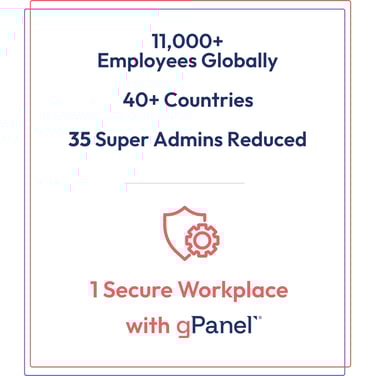
This is exactly the challenge Trimble, a global technology leader, faced as their environment scaled. With over 11,000 employees, they realized that having too many users with broad administrative access created a significant security risk.
By adopting gPanel, Trimble was able to move toward a "least privilege" model, using granular delegation to lock down their domain while still empowering their team.
gPanel gives IT teams the control layer Google Workspace doesn't ship with: proactive, not reactive, and built for the way real organizations actually operate.
How Can I Quickly Audit My Google Workspace Security? A 5-Minute Health Check
You don’t need a full-scale audit to spot early warning signs. Google Workspace provides a strong set of native tools to monitor your domain. However, as your organization scales, the time required to manage these settings can grow exponentially.
Use the table below to audit your environment and see how gPanel streamlines native Google Workspace security tasks into efficient, high-visibility workflows.
|
Security Priority
|
Native Administration (Google Admin Console)
|
gPanel Advantage (The "Pro" Fix)
|
|
Two-Step Verification Enforcement
|
Review and update 2-Step Verification status on a per-user basis.
|
Bulk-enforce 2SV across specific OUs, groups, or the entire domain in a single action.
|
|
Admin Privileges
|
Assign pre-defined administrator roles that often grant broad domain access.
|
Use granular delegation to assign "micro-permissions," allowing staff to perform specific tasks without Super Admin access.
|
|
External Sharing
|
Manage global sharing policies and review individual file permissions.
|
Drive Search & Sweep provides a unified dashboard to visualize and manage all external shares at once.
|
|
Orphaned Accounts
|
Monitor user activity and manually suspend accounts based on last sign-in
|
Automated Decommissioning workflows identify and secure inactive accounts based on your custom policies.
|
|
Data Protection
|
Review audit logs to investigate security events after they occur.
|
Rules Engine allows you to set proactive triggers that alert IT or restrict access the moment an anomaly is detected.
|
Top 10 Secret Security Risks Hiding Inside Google Workspace
Most security breaches don't happen because of complex external hacks; they happen because of everyday usage patterns that drift over time:
- Overpermissioned user accounts
Many environments accumulate excessive permissions over time. When IT teams grant broad access for convenience, they effectively hand out "keys to the kingdom" that attackers can use to move laterally if an account is compromised.
- Misconfigured Google Groups
Groups control access at scale, but a single incorrect setting can expose sensitive data to the entire domain… or the public web.
- Unmanaged third-party app access
Users often connect tools without security review, granting broad OAuth permissions that apps retain indefinitely, even after they are abandoned.
- Weak or reused passwords
Despite strong policies, identity attacks are still a primary threat. Without hardware-backed multi-factor authentication (MFA) or strict enforcement, passwords remain a single point of failure.
- Unchecked external sharing settings
Collaboration with vendors and clients is essential, but without visibility, files often move outside the domain without centralized tracking.
- Unmonitored mobile devices
Personal devices connecting to Workspace data without consistent controls create a significant unmanaged risk surface, especially in bring-your-own-device (BYOD) environments.
- Insider threats and human error
Whether accidental or intentional, human error remains a top vulnerability. A user accidentally clicking "share with anyone with the link" can be as damaging as a malicious actor.
- Inactive or "orphaned"accounts
Users who leave the organization but retain active accounts with intact permissions provide a quiet entry point for attackers to harvest data.
- Lack of audit log retention
Native logs have limits. For organizations in regulated industries, losing audit data after six months makes forensic analysis nearly impossible.
- Inconsistent user offboarding
If a user’s access isn’t completely revoked across all integrated apps and Drive files, the door remains cracked open.
How Do You Implement Least Privilege in Google Workspace?
The Principle of Least Privilege (PoLP) means giving users the minimum access required for their job, as well as the minimum time necessary.
Implementing this at scale requires a structured approach:
- Segment by Scope: Use Organizational Units (OUs) to group users by access requirements rather than just department charts.
- Define Purpose-Built Roles: Replace broad Super Admin status with custom roles that grant specific permissions, such as "Help Desk Admin" or "Password Support Admin".
- The "Dual-Account" Strategy: Following Google’s best practices, Super Admins should have two identities: a privileged account for admin duties and a standard account for daily tasks like email and document editing.
- Continuous Review: Manual enforcement breaks down at scale. You need automated systems that enforce least privilege continuously, not just during annual audits.
Stop Reacting, Start Preventing: 10 Ways gPanel Transforms Google Workspace Security Management
gPanel doesn't replace the Google Admin console; it supercharges it, providing the "scalpel-like" granularity that security requires.
- Centralized visibility across your entire domain: See users, files, and permissions across your entire domain in a single dashboard.
- Automated user offboarding to revoke access instantly: Execute a complete sequence (e.g. password resets, data transfers, and license reclamation) in one click.
- Custom rules and alerts for suspicious activity: Configure the Rules Engine to flag and respond to anomalies, such as logins from blacklisted IPs, before they escalate.
- Bulk policy enforcement across users and OUs: Apply domain-wide changes, such as enforcing MFA or password policies, in a single action.
- Deep reporting beyond the Google Admin Console: Access over 70 customizable reports that span a user's entire lifecycle, bypassing the native console's data limits.
- Drive management and external sharing controls: Use Drive Search & Sweep to locate and fix risks in bulk, such as removing "Public on the Web" permissions.
- Delegation and admin role management at scale: Assign granular "micro-permissions" to junior IT or HR without granting full system access.
- Scheduled audits and compliance reporting: : Automate recurring scans for risky file shares to maintain continuous compliance.
- Real-time monitoring of user activity: Track login history, device use, and file access to guide rapid incident response.
- Proactive license management: Automatically identify accounts that haven't logged in for 30+ days to reclaim licenses and reduce wasted spend.
Take the Guesswork Out of Google Workspace Security With gPanel
You don’t need to guess where your risks are. You don’t need to rely on manual audits.
gPanel gives you the visibility and automation to manage security with confidence, even as your environment grows. If you want consistency, you need systems that enforce it for you.
If it’s time to step up your security game, we’re here to help. Book a demo with us today to get started.
Why Are Google Groups & External Sharing Major Security Risks?

Google Groups and sharing settings are powerful but risky because they control access at scale. A misconfigured group can instantly expose an entire folder of sensitive documents to an unauthorized audience.
Likewise, external sharing creates a layer of complexity where files move outside the domain without centralized tracking. If you don’t have clear visibility into every file shared externally, you may be forced to rely on trust rather than a proactive security strategy.
gPanel bridges this gap by surfacing every externally shared file in a single view, allowing admins to revoke access in bulk.
How Do You Manage These 6 Risky Third-Party App Permissions?
Third-party apps extend Workspace functionality but introduce significant risk if left unmonitored.
- OAuth Permissions with Excessive Scopes: Apps often request broad data access far beyond what is required for their function.
- Unvetted "Shadow IT" Apps: Users frequently connect tools without IT approval or security review.
- Abandoned Apps with Active Permissions: Old integrations may continue accessing company data long after their actual use has ended.
- Scope Creep in Approved Apps: Apps often expand their capabilities and retain access without IT re-evaluating the new risks.
- Lack of Centralized Visibility: Admins cannot manage risks they cannot see; many organizations have no unified way to track all connected apps.
- Inconsistent Revocation Processes: Manually removing app access is tedious and often delayed, leaving gaps in your security posture.
Case Study: Trimble Strengthens Security & Visibility with gPanel
Trimble, a global technology leader, faced a common scaling challenge: as their Google Workspace environment grew, so did their security risk.
Challenge
Trimble identified that roughly 35 users in their environment held Super Admin privileges. In a global organization with over 11,000 employees, this broad access posed a significant risk. They needed a way to delegate routine tasks without handing out "keys to the kingdom."
Solution
Trimble turned to gPanel to refine their administrative roles. By leveraging gPanel’s granular delegation, they began reducing the number of Super Admins, replacing them with custom roles tailored to specific tasks.
Additionally, when Trimble ended a long-term relationship with an external firm, they used gPanel to audit and verify that all shared file access was successfully revoked.
Outcome
- Reduced Attack Surface: Successfully moved toward a least-privilege model by reducing Super Admin counts.
- Enhanced Audit Confidence: Used gPanel reports to verify the cleanup of external sharing, ensuring no data "leaks" remained.
- Strategic Dialogue: As Frej Krook, Google Workspace Platform Manager at Trimble, noted: “We see gPanel as a powerful tool in our broader journey to improve visibility and security. It's helping us start the right conversations.”
10 Common Questions About Securing Google Workspace with gPanel
While the Google Admin Console provides a solid foundation, gPanel supercharges your security with advanced visibility, automation, and granular delegation. Use the following frequently asked questions to understand how gPanel addresses common security gaps and proactively protects your domain.
-
Why is gPanel better than the Google Admin console for security?
It offers deeper visibility, automated remediation, and granular delegation that native tools lack.
-
Can gPanel help with compliance reporting?
Yes, it provides over 70 customizable reports to support SOC 2, HIPAA, and GDPR audits.
-
How does gPanel handle offboarding?
It automates the entire sequence (revoking access and transferring data) to ensure no "orphaned" files remain.
-
Does gPanel work with all Workspace tiers?
Yes, it integrates across all tiers to enhance native security capabilities.
-
How quickly can gPanel surface suspicious activity?
You can detect and respond to threats in real time through custom Rules Engine alerts.
-
Can I enforce policies across specific OUs?
Yes, gPanel allows you to target specific groups or OUs for policy enforcement.
-
How does gPanel reporting differ from Google's?
It provides more granular data and preserves history far longer than the native Google Admin console.
-
How does gPanel help prevent accidental data exposure on Google Drive?
gPanel features a powerful "Drive Search & Sweep" tool that allows admins to search for files across the entire domain based on specific criteria and then bulk-revoke access to those files.
-
How does gPanel reduce human error?
By replacing manual, multi-step processes with automated, "set-it-and-forget-it" workflows.
-
Is gPanel secure itself?
Yes, gPanel undergoes annual third-party penetration testing and is ISO 27001 certified.
Your Google Workspace Is Only as Secure as the Tools Behind It
Google provides a strong foundation, but what you build on top determines your actual security. Relying on manual processes creates gaps, and a lack of visibility allows risks to grow unnoticed.
If you’re ready to move from reactive fixes to proactive security, it’s time to see what gPanel can do.
Schedule a demo here or try our interactive demo.







 User Management
 Group Management
 OU Management
 Gmail Management
 Drive Management
 Calendar Management
 Device Management
 Workspace Reporting
 Workspace Automation
 Billing & License Management



 John Pettit

 John Pettit : Oct 30, 2025, 5:00:00 AM