 User Management
 Group Management
 OU Management
 Gmail Management
 Drive Management
 Calendar Management
 Device Management
 Workspace Reporting
 Workspace Automation
 Billing & License Management

February 2026 Feature Updates & Bug Fixes
 Monica Patel : Mar 9, 2026
gPanel Release Notes for Febraury 2026. Monthly summary of feature updates and bug fixes.




Simplify Google Workspace management with our most essential tools for user and email administration.

Unlock powerful automation, bulk actions, and reporting features to streamline and scale your admin workflows.

Take full control of your domain with advanced policies, APIs, and security tools built for large or complex environments.


Admins can now enable or disable the Change Log requirement for the following Drive permissions: Can View Drive Explorer, Can Update Shared Drive Permissions, and View Shared Drives.
When Change Logs are enabled, users will be required to provide a justification before accessing the Drive Explorer or Shared Drives. 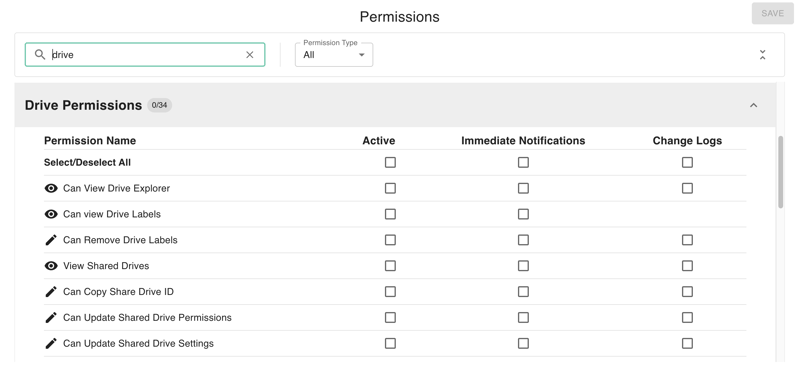
This feature helps Google Workspace admins control access to sensitive assets in Drive Explorer and Shared Drives by requiring users to provide a reason before viewing it. It also improves visibility and audit tracking of user activity and events through logs.
We've added a Group Member Expiration Date option to gPanel's custom roles. Once the expiration date occurs, role members will lose access to that group.

Why This Matters
This feature improves security and access control by ensuring temporary permissions are automatically revoked without manual intervention.
We have added new Expiration Date & Time option for email signature templates. Once the expiration date is reached, the signature template transitions to a "non-scheduled" state.
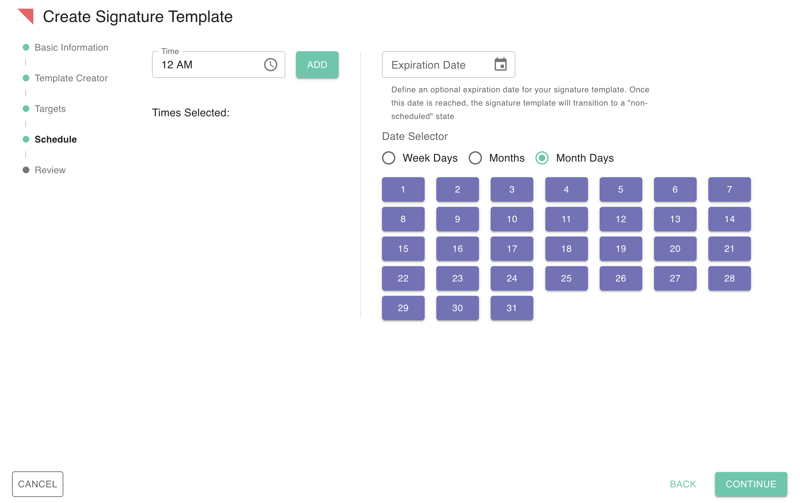
This feature ensures signatures are applied only when needed, improving compliance and reducing manual management.
We've rolled out several updates to our User Interface (UI) this month, including:

These updates make our platform more intuitive, polished, and require less clicks.
Calendar Editing: Resolved an issue in Calendar that impacted editing functionality.

 Monica Patel : Mar 9, 2026
gPanel Release Notes for Febraury 2026. Monthly summary of feature updates and bug fixes.
 Monica Patel : Apr 8, 2026
gPanel Release Notes for March 2026. Monthly summary of feature updates and bug fixes.
 Monica Patel : May 6, 2026
gPanel Release Notes for April 2026. Monthly summary of feature updates and bug fixes.