BulkSignature has long served as a reliable way for organizations to standardize branding across Google Workspace. By deploying branded templates, IT teams can avoid the manual headache of individual user setups. However, in a dynamic business environment, static signatures quickly become a liability.
 Consider a rapidly scaling financial services firm or a healthcare provider: departments shift, job titles evolve, and new hires onboard weekly. When your signature data is disconnected from your Google Directory, a simple promotion can lead to weeks of outdated contact info and "brand friction."
Modern Google Workspace admins are moving toward alternatives that treat signatures as a living part of the employee lifecycle, rather than a standalone project.
You need a platform that connects directly to onboarding, directory synchronization, and governance to ensure consistency at scale.
7 Benefits That Separate Great Email Signature Software From the Rest
Email signature management is about more than just a pretty logo; it’s a critical touchpoint for branding, compliance, and operational efficiency. Here is what the best platforms bring to the table:
-
Centralized Deployment Across Your Entire Domain
Stop relying on users to "copy-paste" their own signatures. Centralized administration lets you push domain-wide updates, standardize legal disclaimers, and eliminate manual edits at the user level.
- Automatic Sync With Your User Directory
Your signature software should be smart enough to talk to your Google Directory. When a title, department, or phone number changes in your records, it should update in the signature automatically.
- Role-Based and Department-Level Signature Assignment
Your sales team needs a "Book a Demo" link, while your legal team needs a multi-paragraph disclaimer. Great tools use Organizational Units (OUs) and conditional logic to assign the right template to the right person.
- Customizable Templates That Don't Require HTML Knowledge
IT teams shouldn't have to be HTML experts to change a font size. Prioritize platforms with drag-and-drop editors and dynamic field insertion for a smoother administrative experience.
 Consistent Rendering Across Email Clients and Devices
Whether your recipient is on Gmail, Outlook, or Apple Mail (and especially on mobile), your company’s email signature should look professional. Formatting breaks can quickly turn a brand asset into a compliance risk. - Compliance and Security Certifications
In regulated industries, security posture is non-negotiable. Look for vendors with SOC 2 certification, GDPR alignment, and robust API security to protect your organizational data.
- Lifecycle Automation Beyond Signature Deployment
The "holy grail" of signature management is a platform that knows when an employee joins or leaves. By integrating with onboarding and offboarding workflows, you ensure signatures are assigned or revoked without a single manual ticket.
Which One is Best for You? Comparing the Top BulkSignature Alternatives Side-by-Side
Organizations evaluating BulkSignature alternatives often compare platforms based on features like automation, deployment flexibility, lifecycle integration, and more.
Feature
|
Patronum
|
GAT Labs |
CloudM |
Zenphi |
gPanel |
Native Gmail API Deployment
|
✔ |
✔ |
✔ |
✔ |
✔ |
Dedicated Signature Designer
|
✔ |
❌ |
✔ |
❌ |
❌
|
Pre-Built Templates
|
✔ |
❌
|
✔ |
❌ |
❌ |
Google Directory Sync
|
✔ |
✔ |
✔ |
✔ |
✔ |
| OU / Department Assignment |
✔ |
✔ |
✔ |
✔ |
✔ |
Alias / Send As Support
|
✔ |
✔ |
✔ |
❌
|
✔ |
| Onboarding / Offboarding Sync |
✔ |
✔ |
✔ |
✔ |
✔ |
Campaign / Banner Scheduling
|
✔ |
✔ |
✔ |
✔ |
✔ |
| Workflow-Based Automation |
✔ |
✔ |
✔ |
✔ |
✔ |
| Purpose-Built for Google Workspace |
✔ |
✔ |
❌ |
✔ |
✔ |
| Per-User Pricing |
✔ |
✔ |
✔ |
❌ |
✔ |
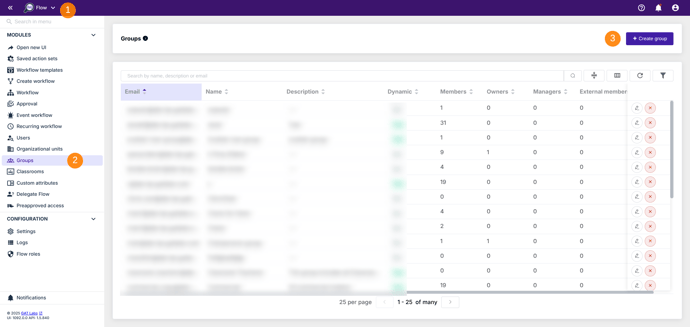
GAT Labs is an extensive suite focused on Workspace oversight, security visibility, and compliance.
- Best For: Organizations prioritizing security auditing and real-time monitoring.
- Key Strength: Uses workflow-driven automation to manage account data and customized reporting mechanisms.
- The Difference: It is CASA Tier 3 and ISO-aligned, making it a heavy hitter for organizations with extreme compliance demands.
“GAT has provided seamless workflows that allow us to effectively manage accounts and data. The customized automated reporting mechanisms allow us to remain informed about specific instances and make informed decisions.”
- Verified Consulting User on G2
| Trait |
BulkSignature |
GAT Labs |
| Primary Use Case |
Dedicated email signature management |
Google Workspace auditing, security, and automation |
| Signature Deployment |
Template-based, direct to inbox |
Workflow-driven via GAT Flow automation |
| Platform Scope |
Signature management only |
Full Workspace audit, compliance, and admin automation suite |
| Security Certification |
SOC 2 Type II, GDPR |
CASA Tier 3, ISO-aligned |
| Administrative Focus |
Signature consistency |
Governance and Workspace visibility |
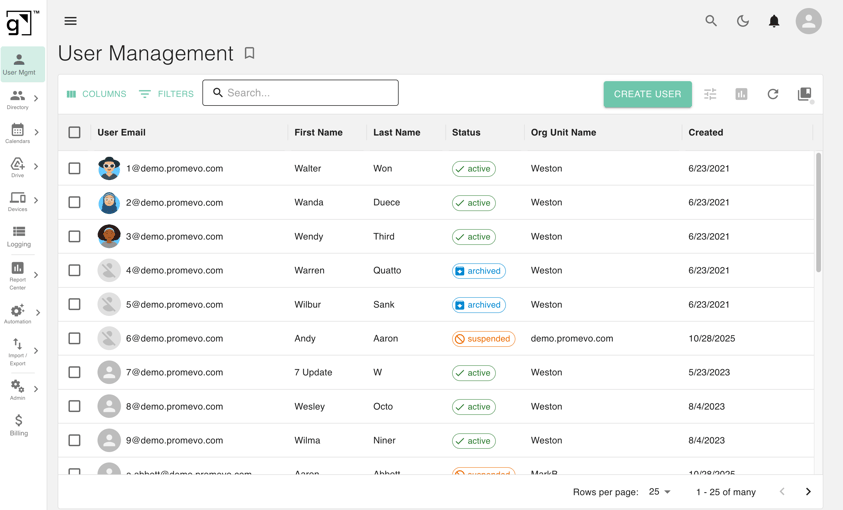
gPanel connects signature management directly to the broader Google Workspace lifecycle. Instead of a siloed tool, it offers a centralized platform for user management, Drive governance, and audit visibility.
- Best For: Regulated industries (Finance, Healthcare, Education) needing scalable administration and strong visibility.
- Key Strength: Built by a Google Diamond Partner, gPanel allows for domain-wide deployment using custom schema and conditional logic.
- The Difference: It moves beyond "static deployment" to "lifecycle-connected automation," streamlining offboarding and Drive ownership alongside signatures.
"With a small IT staff, gPanel and Promevo allowed us to securely share Google administration across multiple team members. We are able to resolve user account issues more quickly while managing tight access controls to our Google domain."
- Scott Krajewski, Associate Vice President for IT at Augsburg University
| Trait |
BulkSignature |
gPanel |
Primary Use Case
|
Dedicated email signature management |
Full Google Workspace admin and management platform |
| Signature Assignment |
User, group, or OU
|
User, group, or domain-wide with custom schema and conditional logic |
Built By
|
Independent SaaS vendor |
Google Diamond Partner |
| Platform Scope |
Signature management only |
Signatures, user management, Drive, Calendar, devices, reporting, automation, billing |
| Operational Approach |
Static deployment
|
Lifecycle-connected automation |
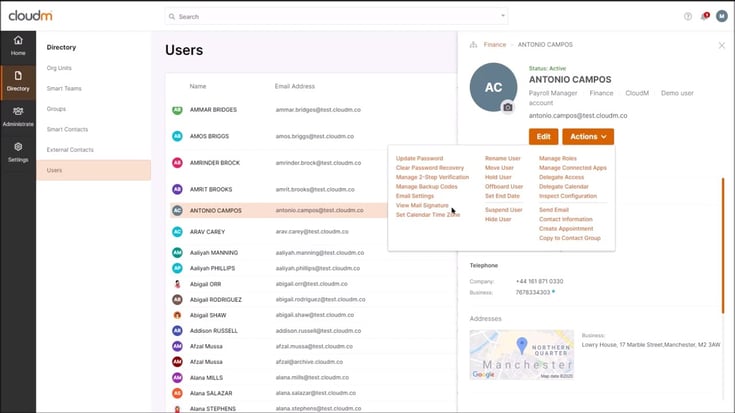
CloudM is a versatile tool that combines signature management with migration tooling, backup, and compliance.
- Best For: Organizations operating in hybrid cloud environments (Google Workspace and Microsoft 365).
- Key Strength: Provides a drag-and-drop designer and out-of-the-box templates for rapid deployment.
The Difference: Its scope extends to multi-platform administration and massive data migrations.
“The off-boarding and automation features seem to work flawlessly, saving a lot of time and reducing Google Vault costs. The UI is easy to understand, and it was straightforward to integrate with Google for user management.”
- Verified User in Newspapers on G2
| Trait |
BulkSignature |
gPanel |
| Primary Use Case |
Dedicated email signature management
|
Google Workspace and Microsoft 365 management platform
|
| Signature Designer |
Template editor with HTML access
|
Drag-and-drop designer with out-of-the-box templates
|
| Campaign Scheduling |
✔
|
✔
|
|
Platform Scope
|
Signature management only
|
Signatures, migrations, backup, and user lifecycle management
|
|
Administrative Scope
|
Signature deployment
|
Multi-platform administration
|
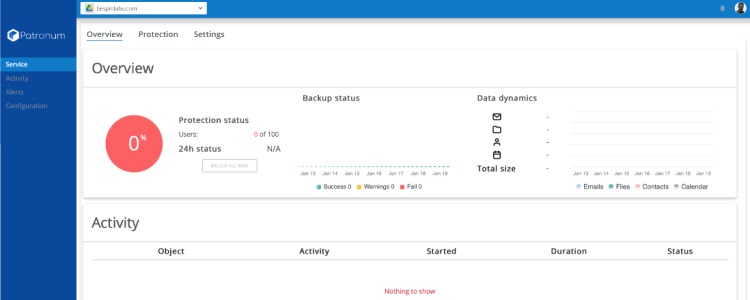
Patronum is a dedicated Google Workspace management platform that treats signatures as a core component of its automation engine.
- Best For: IT teams looking for deep Workspace-native automation without the need for SMTP rerouting.
- Key Strength: Features a dedicated signature designer and pre-built templates specifically for Google environments.
- The Difference: It offers automated domain-wide contact sharing and org chart generation as part of the signature ecosystem.
“[Patronum] is a great product helping us to avoid using GAM and have an easy-to-use interface to manage contact sharing, signatures, email delegation, Google Drive, offboarding and other automation policies.”
- Virgil C., Education Management User on Software Advice
| Trait |
BulkSignature |
Patronum |
|
Primary Use Case
|
Dedicated email signature management
|
Google Workspace management platform with signature management built in
|
|
Deployment Method
|
Direct inbox installation
|
Gmail API — no SMTP rerouting, no impact on encryption
|
|
Alias / Send As Support
|
❌
|
✔
|
|
Platform Scope
|
Signature management only
|
Signatures, contact sharing, Drive, onboarding/offboarding, org chart
|
|
Lifecycle Integration
|
Limited
|
Deep Workspace-native automation
|
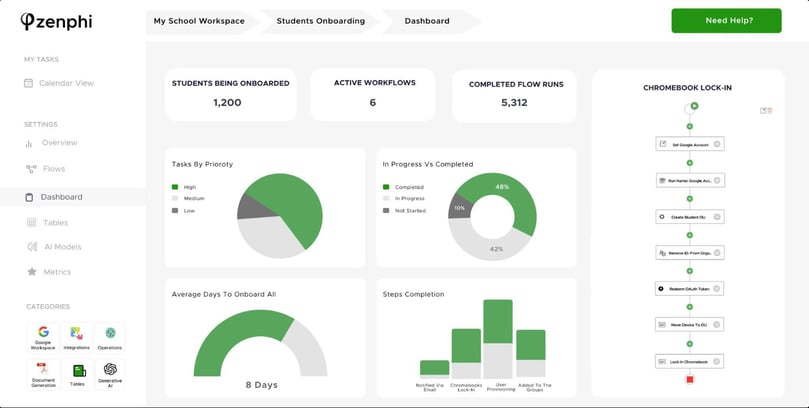
Zenphi takes a unique approach by managing signatures through no-code workflow automation.
- Best For: Teams that want to automate end-to-end business processes beyond just IT administration.
- Key Strength: Signatures are built as an automated workflow using Google Docs templates and directory data.
The Difference: Its pricing is based on workflow runs rather than per-user, making it highly scalable for specific process-heavy teams.
“I like [Zenphi’s] ease of use and how it enables workflow automation without coding. The integration with Google Workspace is seamless and simplifies many repetitive tasks.”
- Cristian C., Administrator on
G2
| Trait |
BetterCloud |
Zenphi |
|
Primary Use Case
|
Dedicated email signature management
|
No-code AI workflow automation for Google Workspace
|
|
Signature Management Approach
|
Managed via signature editor and dashboard
|
Built as an automated workflow using Google Docs templates and Directory data
|
|
Pricing Model
|
Per user per month
|
Per workflow runs (not per user)
|
|
Platform Scope
|
Signature management only
|
End-to-end process automation across all Google Workspace apps and 100+ integrations
|
|
Operational Model
|
Static template management
|
Dynamic workflow automation
|
Which BulkSignature Alternative Has Customers Constantly Raving?
After reviewing the side-by-side feature comparisons, the ultimate question is which platform truly delivers on the promise of lifecycle automation and scalable Google Workspace administration. Here is some real-world feedback from forward-thinking IT Directors who have implemented gPanel.
“gPanel takes a lot of the heavy lifting out of Workspace administration. It’s made it easy for us to manage user accounts and groups, handle email signatures consistently, clean up Drive ownership when people leave, keep track of sharing settings, and run bulk updates without spending hours in the Admin console. Overall, it’s helped us streamline workflows and stay organized, especially as our user count has grown.”
“I love how intuitive and easy to use gPanel is, especially for handling IT administration tasks like managing Google accounts. The setup process was smooth and straightforward, and its features for creating, deactivating accounts, and managing Google Groups significantly streamline my workflow. It's a reliable tool for managing permissions and settings effortlessly.”
- Joao R., IT Intern on G2
9 Email Signature Management Pitfalls That Cost Teams Time & Money
Weak signature management creates more than just an eyesore; it creates compliance gaps and administrative overhead. Avoid these common Gmail management traps:
- Letting Users Manage Their Own Signatures: This is the fastest way to get inconsistent branding and outdated titles. Centralized administration is the only way to maintain a professional standard.
- Choosing a Tool That Doesn't Integrate With Your Email Platform: If your signature tool doesn't talk to your directory data, you’re doubling your maintenance work.
- Prioritizing Price Over Deployment Capability: Lower-cost platforms often cut corners on reporting, scalability, or lifecycle integration, which costs you more in labor later.
- Underestimating Onboarding and Setup Complexity: Fragmented workflows can stall your rollout. Always validate how easy it is to build and push templates.
- Ignoring How Signatures Render on Mobile: Most business emails are now read on mobile. If your signature doesn't render perfectly there, it doesn't work.
- Locking In Before Testing With Real Users: Before you push to 500 users, validate the directory synchronization and deployment behavior with a small group.
- Overlooking What Happens When an Employee Changes Roles: Static systems can't keep up with a dynamic workforce. You need a tool that reflects title and department shifts in real-time.
- Treating Signature Management as a One-Time Project: Email signatures require continuous sync to remain accurate.
- Separating Signature Management From User Lifecycle Administration: Disconnected systems create operational fragmentation. Lifecycle-connected automation ensures your data stays clean from hire to retire.
8 Commonly Asked Questions About Email Signature Management Software
Organizations evaluating BulkSignature alternatives often ask similar questions around deployment, compatibility, automation, and governance:
- Can Email Signature Software Work Across Multiple Email Clients?
Yes. Most modern platforms support rendering across Gmail, Outlook, Apple Mail, mobile devices, and webmail clients.
- Do Employees Need to Install Anything for Signatures to Deploy?
Many platforms deploy signatures centrally through Google Workspace APIs without requiring local installation. Deployment methods vary by platform.
- What's the Difference Between Client-Side and Server-Side Signature Deployment?
Client-side deployment applies signatures directly inside the user mailbox. Server-side deployment applies signatures after the email sends through centralized routing infrastructure.
- Can Signatures Be Assigned Differently by Department or Role?
Yes, most enterprise-grade platforms support organizational unit assignments, conditional logic, department templates, and role-based deployment rules.
- What Happens to Signatures When an Employee Leaves the Company?
Lifecycle-connected systems can automatically remove or disable signatures during offboarding workflows. Automation reduces administrative delays.
- Is Email Signature Software Secure Enough for Regulated Industries?
Many platforms support compliance requirements through certifications, encryption standards, access controls, and audit visibility. Organizations should still validate vendor security posture individually.
- How Long Does It Typically Take to Roll Out Signatures Across a Team?
Deployment timelines vary based on organization size, template complexity, directory cleanup requirements, and approval workflows. Many deployments move quickly once templates and data structures are finalized.
- Why Do Organizations Replace Standalone Signature Tools?
Many organizations eventually need broader lifecycle integration, automation, reporting, and Workspace administration capabilities beyond standalone signature deployment.
The Right Email Signature Tool Comes Down to How You Work
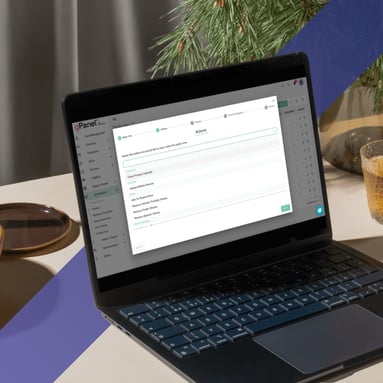
Selecting a BulkSignature alternative is a decision that affects your brand’s daily digital footprint. While a simple template tool might work for a small, static team, growing organizations need a platform that connects signatures to the Google Workspace lifecycle.
By integrating signatures with directory synchronization and onboarding automation, you move from manual maintenance to operational control. Whether you prioritize:
- The security auditing of GAT Labs
- The hybrid-cloud management of CloudM,
- The comprehensive administration of gPanel
…the goal is a system that evolves with your company.
gPanel by Promevo provides the scalable administration and Workspace-native governance required to keep your branding and data aligned, no matter how fast you grow.
Ready to streamline your domain management? Schedule a gPanel demo or try our interactive experience today.







 User Management
 Group Management
 OU Management
 Gmail Management
 Drive Management
 Calendar Management
 Device Management
 Workspace Reporting
 Workspace Automation
 Billing & License Management



 John Pettit

 John Pettit : Sep 18, 2025, 5:00:00 AM